The Ultimate Guide to AI Nail Art Design Apps: Revolutionize Your Manicure with AI
Explore how AI nail art design apps transform creativity in nail art. Discover salon-grade designs instantly with AI technology.

Estimated reading time: 5 min read
Key Takeaways
- AI and AR Fusion: AI nail art design apps combine machine learning and augmented reality to generate and preview custom designs in seconds.
- Enhanced Creativity: Text-to-design, theme libraries, and color pickers unlock endless creative possibilities for professionals and enthusiasts.
- Efficiency Boost: Live previews and virtual try-ons streamline consultations, save time, and reduce polish waste.
- Professional Edge: Nail artists can forecast trends, build digital portfolios, and offer remote consultations.
- Future Trends: Expect salon integration, real-time trend prediction, and eco-friendly recommendations.
Table of Contents
- Introduction
- Background and Evolution of Nail Art
- What Is an AI Nail Art Design App?
- How AI Nail Art Design Apps Work
- Key Features and Benefits
- User Experience and Tips for Getting Started
- Trends and Future of AI in Nail Art
- Conclusion
- FAQ
Introduction: AI Nail Art Design Apps Transforming Creativity
The AI nail art design app is revolutionizing the beauty world by harnessing artificial intelligence to generate personalized, stunning nail designs effortlessly. Machine learning, augmented reality, and trend data blend to deliver salon-grade looks in seconds—making creativity accessible to everyone from casual enthusiasts to professional nail artists.
Background and Evolution of Nail Art
Traditional nail art relies on manual techniques like hand-painting, stickers, stamping tools, and freehand designs. These methods demand significant skill, steady hands, and lots of time. Common challenges include:
- Inconsistency: Every hand-paint can vary.
- Limited complexity: Fine details require practice and special brushes.
- Customization hurdles: Salons may not offer every color or style you want.
Early digital tools tried to bridge the gap with basic photo-editing apps that applied simple filters or cut-and-paste designs over nail photos. They offered more variety but still lacked realism and personalization.
Now, AI integration changes everything. Modern AI nail art design app solutions automate design generation and real-time previews. You get:
- Instant, unique designs based on trend data.
- Interactive AR try-on to see the final look on your hand.
- Time savings by skipping back-and-forth with nail salons.
What Is an AI Nail Art Design App?
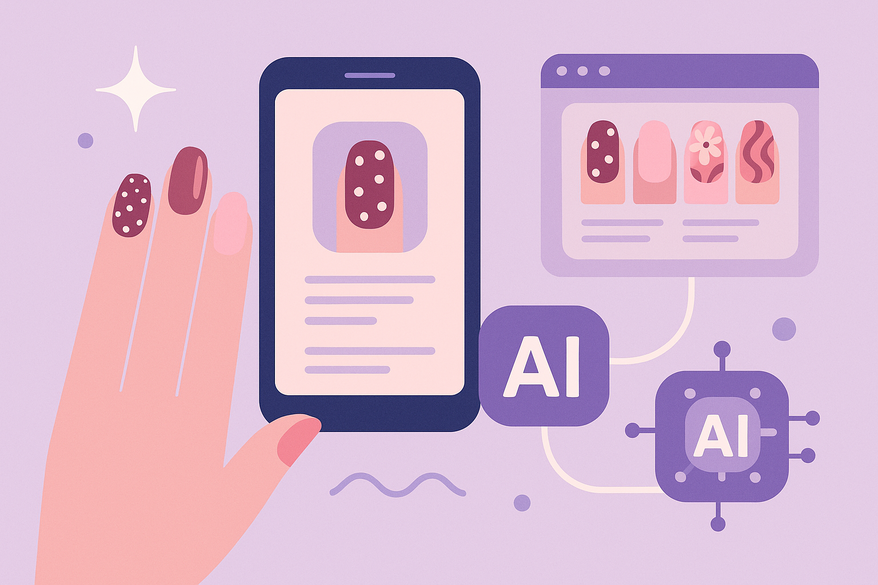
An AI nail art design app is a mobile or web-based tool that uses machine learning, augmented reality (AR), and computer vision to create and simulate custom nail designs from text prompts, uploaded photos, or user preferences.
Core functionalities include:
- AI-Generated Designs: Leverages generative models trained on Instagram, TikTok, and runway feeds to craft fresh nail patterns.
- Virtual AR Try-On: Uses your camera to overlay textures and colors on live hand images for realistic previews.
- Gallery and Sharing: Save designs, build collections, and share looks on social media or with your nail artist.
Example use case: You type “pastel floral wedding nails,” and within seconds the app gives you five unique pastel flower designs to swipe through. That’s powerful creative freedom in your pocket.
How AI Nail Art Design Apps Work
Technology overview:
- Machine Learning: Models analyze millions of images to generate trend-driven designs.
- Computer Vision: Detects nail shape, size, and skin tone for accurate fitting.
- AR Overlays: Renders nail art on live camera feeds with realistic shadows and textures.
User flow breakdown:
- Input Preferences
- Text prompts: “chrome mirror tips,” “aura gradient.”
- Choose a theme: “Vibrant,” “Minimalist,” “Glam.”
- Upload a hand photo to get a personalized fit.
- AI Processing
- The app references trend datasets and style libraries.
- It generates multiple design options in seconds.
- Output & Preview
- View designs via AR. Adjust nail length, shape, lighting, and skin tone.
- Take screenshots or export high-res mockups for salon use.
Benefit highlight: This workflow slashes trial-and-error. Vague ideas become salon-ready visuals, cutting consultation time and boosting client satisfaction.
Key Features and Benefits
Feature list:
- Design Customization
- Text-to-design: Type what you want.
- Color pickers: Adjust hues, finishes, and opacities—perfect when you tie into digital nail polish color matching.
- Theme libraries: Browse “Gradient,” “Minimalist,” “Boho,” “Neon.”
- Virtual Try-On
- Real-time AR camera previews.
- Adapts to hand movements and angles.
- User-Friendly Interface
- Guided prompts help first-timers.
- Save & share galleries.
- Trend feeds show seasonal or viral styles.
Benefits for professionals:
- Faster client consultations with live previews.
- AI trend forecasting reduces guesswork.
- Digital portfolio creation to showcase skills.
Benefits for enthusiasts:
- Risk-free experimentation—no dry time or polish waste.
- Time savings by refining looks at home before salon trips.
- Inspiration library for daily or event looks.
User Experience and Tips for Getting Started
App selection guide:
- Search for “AI Nail Art Generator,” “Nail AI Nail Designer,” or “NailedBy.”
- Check for 4★+ ratings and AR preview features.
- Review privacy details—ensure images process locally or via secure servers.
Beginner tips:
- Use built-in quizzes to match your skin tone and style mood.
- Start with pre-made templates before customizing colors and motifs.
Advanced tips:
- Upload high-resolution hand photos for precise AR fitting.
- Tweak individual elements (gradient angle, polish finish) via drag-and-drop.
- Save multiple drafts to compare side-by-side.
Troubleshooting:
- Poor lighting: Scan hands under natural light or a ring light.
- Incomplete designs: Adjust prompts (e.g., add “detailed” or “minimal”).
- Free trials: Test premium features risk-free before committing.
For salon professionals considering virtual consultations, learn more at virtual manicure consultation guide.
Trends and Future of AI in Nail Art
Current trends:
- Chrome Effects: Mirror-like finishes reflecting light angles.
- Aura Blends: Soft color fades with ethereal, holographic vibes.
- Seasonal Motifs: Holiday shapes (hearts, snowflakes) auto-generated.
- Personalized Quizzes: AI polls your style and mood for custom palettes.
Future innovations:
- Remote Virtual Consultations: Artists review your AR nails in real time.
- Salon Booking Integration: Design app links directly to scheduling platforms.
- Real-Time Trend Prediction: AI expands datasets to spot micro-trends before they go viral.
- Eco-Friendly Polish Recommendations: AI suggests more sustainable brands.
Industry impact:
- Empowers nail artists with efficient creative tools.
- Democratizes high-end nail art for home users.
- Drives competition toward more innovative, user-centric beauty tech.
For an all-in-one glow up solution, explore how Maxx Report uses AI to analyze your nail art, facial features, and beyond.

Conclusion
AI nail art design apps have shattered traditional limitations by combining generative AI design, AR try-ons, and deep customization. These tools save time, reduce waste, and unlock endless creativity for professionals and enthusiasts alike.
The AI nail art design app has revolutionized nail art, making stunning, personalized manicures accessible to everyone. Download an AI nail art design app today, experiment with its features, and elevate your manicure game to the next level.
FAQ
What platforms support AI nail art design apps?
Most apps are available on both iOS and Android, with some offering web-based versions for desktop use.
How realistic are AI-generated designs compared to salon work?
With advanced AR overlays and high-resolution mockups, the designs are virtually indistinguishable from professional salon results.
How does the virtual try-on feature work?
Using computer vision, the app detects your nail shape and skin tone to overlay designs on a live camera feed, complete with realistic shadows.
Is my privacy safe when uploading hand photos?
Reputable apps process images locally or via secure servers. Always review privacy policies and opt for apps with end-to-end encryption.