AI Nail Art Design App: Revolutionize Your Manicure with Artificial Intelligence
Transform your manicure routine with an AI nail art design app, offering personalized, salon-grade creativity and AR virtual try-ons from your smartphone.
Estimated reading time: 5 minutes
Key Takeaways
- AI-powered creativity: Generate custom nail designs instantly.
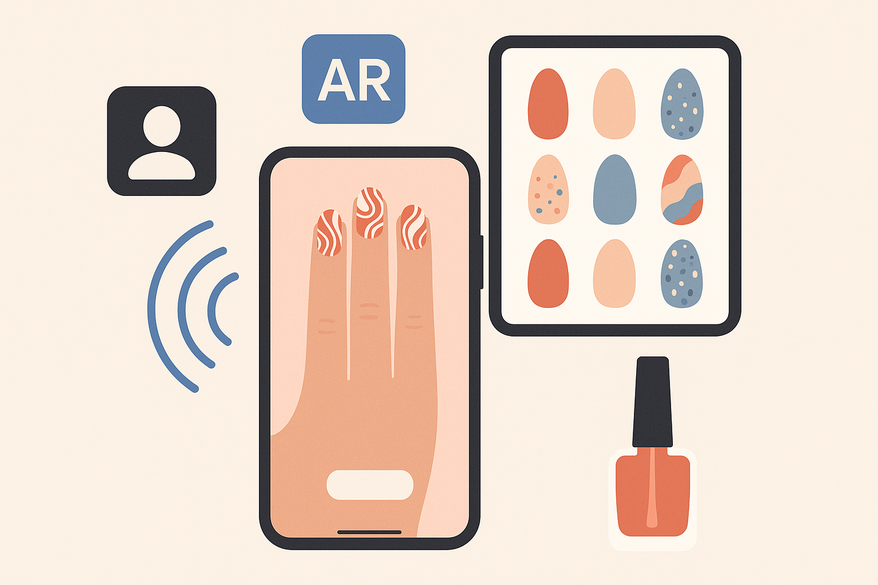
- Virtual AR try-on: Preview nail art live on your hand.
- Deep customization: Adjust shape, color, finish, and patterns.
- Smart suggestions: AI analyzes your style for tailored recommendations.
- Cost & environment: Save time, money, and reduce polish waste.
Table of Contents
- Overview of AI Nail Art Design App
- Core Features
- How to Use
- Benefits
- AI vs. Traditional Methods
- Future Trends
- Conclusion
- FAQ
Overview of AI Nail Art Design App in Beauty & Nail Art
Artificial intelligence has reshaped the beauty industry by enabling:
- Virtual try-ons for makeup and skincare shade matching.
- Hair simulation tools that preview colors and cuts.
- Nail art design apps that generate new manicure ideas and overlay them on real hands. (Sources: CyberLink MyEdit, LooksMaxx Report)
Key impacts on nail art:
- Democratizes creativity – anyone can create salon-grade patterns without artistic skill. (Sources: Fotor AI Nail Generator)
- Speeds up ideation – tailored suggestions on demand save endless scrolling. (Sources: LooksMaxx Report)
- Bridges home and salon – design at home, then execute with an exact visual reference. (Sources: CyberLink MyEdit)
Core Features of AI Nail Art Design App
Most AI nail art apps include:
- Text-to-Design Generation
AI models convert text prompts (e.g., “pastel French tips with gold stars”) into unique images. (Sources: Nail Art Design Beauty Nails, Fotor AI Nail Generator) - Virtual Try-On (AI + AR)
Real-time overlay on live camera or uploaded photos. (Apps: NailedBy AR Try-On, YouCam Nails) - Design Customization
Control color palettes, finishes, patterns, and nail shapes. (Sources: YouCam Nails) - Pattern Recognition & Smart Suggestions
AI analyzes past designs to suggest complementary looks. (Sources: Fotor AI Nail Generator) - Photo-Based Design Replacement
Brush over nails in a photo to apply new AI-generated designs. (Sources: CyberLink MyEdit) - Saving, Sharing & Export
Save to gallery, share on social media, or send to your nail technician. (Sources: YouCam Nails)
How to Use AI Nail Art Design App: Step-By-Step Guide
- Download & Install – Search for NailedBy or YouCam Nails.
- Grant Permissions & Set Preferences – Allow camera and gallery access. Select favorite colors and shapes.
- Choose Mode – “AI Nail Generator” for prompts or “Live Try-On” for AR. (Source: Fotor AI Nail Generator)
- Capture or Upload Hand Photo – AR mode auto-detects fingers; photo mode lets you brush over nails. (Source: CyberLink MyEdit)
- Enter Prompt or Choose Template – E.g., “short nude coffin nails with white marble effect.”
- Refine & Customize – Adjust shape, color, finish, and add stickers. (Source: YouCam Nails)
- Save & Share – Tap Save to gallery or library, then share or show to your nail tech.
Benefits of AI Nail Art Design App
- Effortless experimentation: Try dozens of styles digitally without tools.
- Endless inspiration: AI generates fresh, personalized ideas.
- Professional outcomes: Salon-quality designs without drawing skill.
- Cost & time savings: Reduce trial-and-error visits and product waste.
- Eco-friendly: Minimize polish waste through virtual trials.
- Confidence: Preview designs on real hands to avoid regrets.
For salon professionals and at-home users alike, explore our Virtual Manicure Consultation Guide.
For an AI-powered evaluation of your nail art creativity, check out Maxx Report which now includes a nail module to rate and refine your designs.

AI Nail Art Design App vs. Traditional Methods
- Idea Generation: AI gives instant personalized suggestions vs. manual inspiration hunting.
- Try-On Capability: Real-time AR preview vs. guessing with sample tips.
- Customization Speed: Change color/shape with taps vs. manual repainting.
- Skill Requirement: No drawing skill needed vs. relying on professional or DIY talent.
- Cost & Waste: Minimal digital waste vs. product waste and salon fees.
- Communication Precision: Exact visual reference vs. verbal descriptions.
Future Trends in AI Nail Art Design App
- Hyper-realistic AR: Advanced 3D hand tracking and lighting.
- Hyper-personalization: AI learns your wardrobe and events to suggest designs.
- Full beauty ecosystem: Nail, makeup, and hair AR in one platform.
- Salon-linked experiences: Booking integration and AI technician instructions.
- AI-driven hardware: Smart nail printers or robots executing designs.
- Community-driven models: Collaborative training by users and artists.
Conclusion: AI Nail Art Design App at Your Fingertips
Exploring an AI nail art design app offers fast, fun, and low-risk styling. With AI-generated designs, AR virtual try-ons, deep customization, and effortless sharing, salon-grade creativity is literally at your fingertips. Download an app, follow the guide, and unlock endless nail art possibilities today.
FAQ
- What is an AI nail art design app? An app that uses AI and machine learning to generate and preview nail designs on your hand.
- How accurate are the virtual try-ons? Most apps use advanced AR to adjust for hand shape, nail length, and lighting for lifelike previews.
- Can I use these apps at home? Yes—design at home, save or share the results, and show them to your nail technician.